In This Release…
[Click here for a video overview of all the new features]
Highlights
Customer/Vendor Dashboard Updates
There have been a few exciting updates to the Customer/Vendor Dashboard, including the Copy Dashboard feature and some new widgets.
Copy Dashboard Feature
Managing your Customer/Vendor Dashboards just got a whole lot easier! This new feature allows you to:
- Copy a Customer/Vendor Dashboard from an active Employee to replace your own.
- Copy your own Dashboard to other Employees, Job Titles, Teams, or Departments.
New Dashboard Widgets
Five (5) new widgets are now available for display on the Customer/Vendor Dashboard, providing more comprehensive data at a glance:
- Contacts List widget
- Assignments (Employees) widget
- Embed Link widget
- Assets Count widget
- Price/Cost List widget: This new widget replaces the Price/Cost List Settings page. Previously, this page was found within the Customer/Vendor waffle menu under the Customer/Vendor Settings page. Now, these settings can be displayed and managed directly on the Customer/Vendor Dashboard, streamlining access to this information.

For more information about these updates, visit our Customer/Vendor Dashboards Guide.
Manually Relate Entities
We’ve made significant improvements to how you connect and track related work within Striven by introducing manual linking across Striven entities. This gives you greater flexibility and control to organize complex relationships.
The below entities in Striven can now be manually related to the following:
- Opportunities: Projects, Tasks, Sales Orders, and Opportunities
- Tasks: Opportunities, Purchase Orders, and Tasks
- Sales Orders: Opportunities and Purchase Orders
- Purchase Orders: Sales Orders
- Projects: Opportunities and Projects
To manually link records, simply look for the Linked To or Related To button located at the top of the entity record (e.g., Opportunity, Task, Project). Clicking this button will open the Linked To window, where you can select the Add option. Within the Add screen, use the Relate To drop-down menu to specify the type of entity you wish to link. You can then search for the specific record(s) by name or number in the search field or paste in the Entity URL directly.

Time Entry Revamp
We are excited to announce a significant enhancement to how time is tracked, managed, and approved in Striven. This revamp moves the approval process from the Weekly Timesheet level down to the individual Time Entry level, providing you with greater flexibility, accuracy, and control.
The Timesheet Approval Queue has been replaced with a new, powerful Time Entry Approval Queue. This queue operates based on flexible date ranges that you define rather than having to approve all Time Entries entered for a Weekly Timesheet.
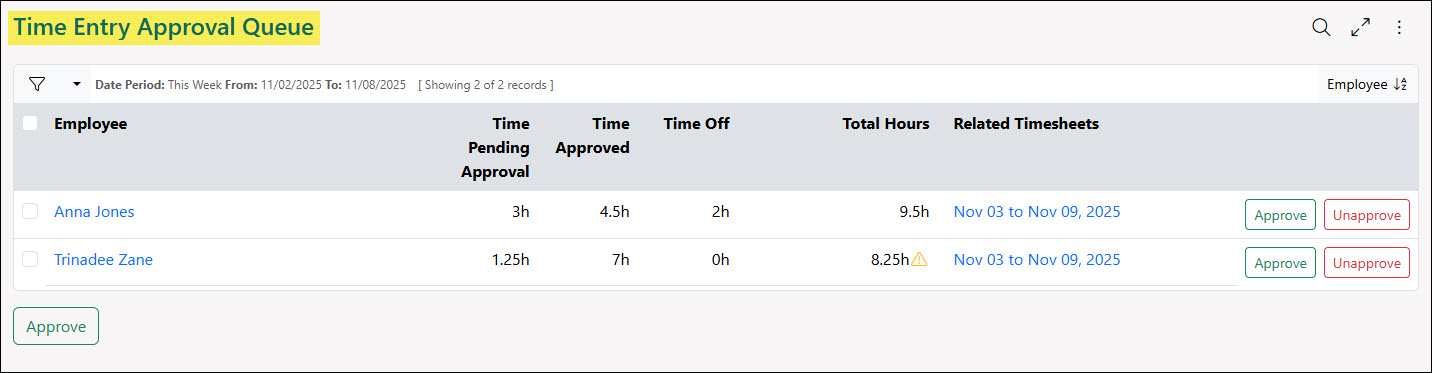
With this update, the following permissions have been added:
- “Time Entry - Add/Edit for all new employees”
- “Time Entry - Add/Edit for anyone in their hierarchy”
The following permissions have been renamed:
- “Timesheet - Add/Edit Manual Time Entries” has been renamed to “Time Entry - Add/Edit Manual Time Entries”
- “Timesheet - Approve and Adjust for all Employees” has been renamed to “Time Entry - Approve and Adjust for all Employees”
- “Timesheet - Approve and Adjust for anyone in their hierarchy” has been renamed to “Time Entry - Approve and Adjust for anyone in their hierarchy”
- “Timesheet - Self Approve” has been renamed to “Time Entry - Self Approve”
The following permissions have been removed:
- “Time Entry - Adjust for Billed Timesheets for all Employees”
To learn more about Time Entries in Striven, review the Time Tracking section from our Time & Expenses Guide.
Add Columns to the Items Section of a PO Format
We’ve enhanced the PO Format with two (2) new column options for the Items section: Customer and Sales Order. You can now include these fields in your PO Format, allowing you to see this data when printing Purchase Orders, provided they are filled out on the Purchase Order in your system. If the fields are left blank on the PO, the columns will be blank when printed.

Gmail Add-on Update
The Striven Gmail Add-on feature now has the option to Select All attachments when creating a task from your Gmail account. The Select All option will be toggled on by default, but you can toggle this option off to deselect all images as well.

To download the Striven Gmail Add-on, visit the Striven for Gmail Google Workspace Marketplace.
Workflows Based on Customer Assets
We’ve introduced a powerful enhancement to Workflows, designed to automate and optimize your service and notification processes related to Customer Assets in Striven. This update includes features for precise scheduling, asset-based Triggers, and Customer Asset related merge fields.

Accounting Updates
Setting for Cash/Accrual for 1099 Export
We’ve added a new default setting on the 1099 Settings page for Cash or Accrual exports. This setting will default the Based On field when using the 1099 Export feature to automatically toggle the export to be set as either an Accrual or Cash Basis.

Changing Tax Dynamically on Invoices
Invoices created from a Sales Order will now automatically utilize the most current Tax Rate defined in the Tax Agencies List, ensuring accurate and up-to-date taxation, rather than retaining the original rate from the Sales Order.
Display Memo on the Reconciliation Page for Checks & Payments
The Memo field is now visible on the Reconciliation page for Checks and Payments. This enhancement enables users to see the Memo content directly during reconciliation.

Default Invoice/Credit Memo Notification Settings
We have added two (2) new default settings on the CRM Settings page allowing you to select whether generated Invoices and Credit Memos will be sent as a PDF to Customers via an automatic notification.

Banking Updates
New Transaction Number Search Filter on the Add Undeposited Items Page
A Transaction Number search filter has been added to the Add Undeposited Items popup window for adding transactions to a Deposit. This new filter allows users to quickly and accurately locate specific transactions by their unique transaction number. This update is designed to improve the efficiency and precision of the deposit creation process, particularly for instances where a user knows the exact transaction number they need to include.

Custom Field Updates
New Open in Next Tab Hover Icon in Alphanumeric Custom Fields for Valid Links
Alphanumeric Custom Fields have been enhanced to automatically recognize valid web links (starting with http:// or https://). When a field contains only a valid URL, an Open in new tab hover icon will appear, allowing the user to click it and open the link. If the field contains any extra text or content, it will function as standard text. The hover icon is hidden while the field is being edited and reappears once the user navigates away, provided the text is still a valid link. This feature is consistently available across various updated areas of the system, including the Customer/Vendor Dashboard, Customer/Vendor Portal, Hub, and settings pages.

Dashboard Updates
Dashboard Widget Limit Increase
The maximum number of widgets allowed on a single Dashboard has been increased from 25 to 30. This system-wide update allows users to display more information on one screen, reducing the need for secondary Dashboards. Users who previously reached the 25-widget cap can now add 5 additional widgets to their existing Dashboards.
Ability to Add “Completed” Sales Order Status to the Sales Orders Widget
The Sales Orders widget has received several upgrades to provide a more comprehensive view of Order fulfillment. The expanded data now includes Sales Orders in the Completed status, in addition to Sales Orders in the Approved status for direct comparison over a chosen period. The visualization has been enhanced with a line chart that clearly displays two distinct data series: Approved Orders in Green and Completed Orders in Blue. Users can interact with the chart by toggling the visibility of either the Approved or Completed lines via new chart legends by clicking on the status at the bottom of the chart. Furthermore, the widget now offers comprehensive totals, displaying the total count of Completed Sales Orders below the existing Approved totals.
- Note: If no Sales Orders are marked Approved or Completed during the widget’s selected time period, only the totals will be shown, and the graph will not display.

Employee Updates
User Role - Employee Access Page Updates
We have enhanced the User Role - Employee Access page to display the Job Title of Employees added to the User Role. Additionally, you may now click on the Employee’s name to open the Employee Summary Card for additional information.

Filter for Employee Location on the Approve Expenses Queue
A new filter for Employee Location has been added to the Approve Expenses Queue. This enhancement allows approvers to efficiently View and Manage Expenses specific to an Employee’s Location, streamlining the Approval Process for multi-location Teams.

Hub Updates
Added .ASC File Type to Accepted File Formats for Hub & Attachments
We’ve added the .ASC file option to the list of accepted formats for Hub and Attachments in Striven.

Items & Inventory Updates
Memos Column & Filter on Builds List Page
The Item Builds List page has been enhanced with two key updates focused on Item Build Memos. First, a new Memo filter allows users to quickly isolate and review specific groups of Builds by filtering the list based on the content of the Memo field. Second, the Memo content is now displayed directly in the column details on the main Item Builds List screen. These improvements provide immediate visibility to the Memo context previously only accessible by drilling into individual records.

Portal Updates
Ability to Apply Open Payments to Open Invoices in Portal
The Customer Portal now allows Contacts to apply open Payments to Invoices. This can be done via the Apply button, which is available on the Transactions List, the Open Balance page, and the Payment page.

To access this functionality, the Contact’s Portal Role must have the “Payments: Apply” permission enabled.

Reports Updates
Old Report Builder is Deprecated
We have finalized the sunsetting process for our Report Builder tool. Effective December 14, 2025, the Old Report Builder has been retired and is no longer available in the system.
What does this mean for you?
- Unified Experience: All custom reporting is now centralized in the New Report Builder.
- Access: Access to the old interface and any reports contained within it has ceased.
- Moving Forward: Please utilize the New Report Builder for all data visualization and export needs. It offers improved performance, better filtering, and enhanced export options compared to the legacy tool.
Trial Balance Details Report Update
The Trial Balance Details Report has been updated with a new search filter for Suppress Accounts With No Activity. When users navigate to the Trial Balance Details Report directly from the main Trial Balance Report, the setting for this new filter will now be retained.

Include Cost Information for Non-Inventory and Service Items on Item Profitability Report
The Item Profitability Report now includes cost and profit for Non-Inventory and Service Items, calculating profitability by aggregating revenue (Invoices) versus costs (Bills, Checks, Credit Card Charges) within the selected date range. Previously, only Inventory Items had full calculations. Inventory and Manufactured Items will continue to calculate cost using the existing FIFO method tied to Invoices and Bills.
Report Builder Dataset Lookup Updates
The Dataset Lookup tool within Report Builder for Relationships now includes a new For Filtering Only label. This addition is intended to clearly indicate when a specific relationship is restricted to use only for filtering purposes.

Added the Reviewed Time to the Transaction History Audit Trail Report
The Transaction History Audit Trail Report has been updated to include a Reviewed Date and Time column, improving transparency of reviewed transactions. This update provides two critical pieces of information: the identification of the reviewer responsible for approving the transaction, ensuring accountability, and a precise timestamp showing the exact date and time the review occurred.

Tasks Updates
Show CC Recipients When Using Email-to-Task Feature
An update has been made to the Email-to-Task feature that enables you to see the carbon copy (CC) recipients when clicking the View Email button to view the original message.

UI Updates
Limit Attachment Uploading to 25 Files Per Batch
To optimize system performance and prevent accidental bulk uploads, we have implemented a limit of 25 files per upload batch in Striven. This change is designed to ensure smoother processing speeds and prevent unnecessary server load caused by users inadvertently selecting an entire folder of files.
If a user selects more than 25 files, the system will now display a message stating, “Only 25 files are allowed to upload in one batch.” Users can still upload more than 25 files in total, but they must be uploaded in separate batches.
Update For Viewing PDFs on Mobile Devices
The mobile behavior for opening PDF attachments has been improved in this release. Previously, both Android and iOS devices experienced difficulties viewing these files. Striven now addresses these concerns by deferring the process of opening PDF files to the mobile browsers, which allows the devices to utilize their native methods for handling the files.
Deprecated Goals
The dedicated Goals feature, which was previously a component within the Striven platform, is no longer available. This functionality has been officially discontinued and removed from the system.
Workflow Updates
Exclude 3AM and 5AM on Saturdays
To optimize system performance, Workflow Triggers set to queue or send at 3:00 AM EST or 5:00 AM EST will not execute on Saturdays.
API Updates
Bill Payments Credit Card Charges API
We have added the ability to utilize Striven’s API to manage Bill Payments for credit card charges. This update rounds out the Striven Fusion Integration, allowing for seamless management of Bill Payments made via credit card.
The following Endpoints have been added to support this functionality:
- Search: Search Bill Payment CC Charges (POST /v2/bill-payment-cc-charges/search)
- Get: Retrieve details for a specific Bill Payment CC Charge (GET /v2/bill-payment-cc-charges/{id})
- Create: Create a new Bill Payment CC Charge (POST /v2/bill-payment-cc-charges)
- Get Applied Bills: Retrieve a list of bills applied to a specific charge (GET /v2/bill-payment-cc-charges/{id}/applied-bills)
- Apply Bill: Apply bills to a Bill Payment CC Charge (POST /v2/bill-payment-cc-charges/{id}/apply-bill)
- Un-apply Bill: Remove an applied bill from a charge (POST /v2/bill-payment-cc-charges/{id}/unapply-bill/{billId})
- Void: Void a Bill Payment CC Charge (POST /v2/bill-payment-cc-charges/{id}/void)
For more information about API Keys, visit our API Settings Guide.
Security Updates
Please review the following settings and adjust your User Roles for these new or updated permissions as needed:
New Permissions:
- “Customer/Vendor Dashboard - Copy to other users”
- “Time Entry - Add/Edit for all employees”
- “Time Entry - Add/Edit for anyone in their hierarchy”
Permission Updates:
- “Timesheet - Add/Edit Manual Time Entries” has been renamed to “Time Entry - Add/Edit Manual Time Entries”
- “Timesheet - Approve and Adjust for all Employees” has been renamed to “Time Entry - Approve and Adjust for all Employees”
- “Timesheet - Approve and Adjust for anyone in their hierarchy” has been renamed to “Time Entry - Approve and Adjust for anyone in their hierarchy”
- “Timesheet - Self Approve” has been renamed to “Time Entry - Self Approve”
- “Time Entry - Adjust for Billed Timesheets for all Employees” has been removed.
Report Builder Additions
Posting Item and Transaction Item in the GL Postings Accrual and Cash Datasets
The Posting Item column and filter in the GL Postings Accrual and GL Postings Cash Datasets has been renamed to Transaction Item.
The Transaction Item column and filter will include the Item that is listed on the transaction, for example, the Item Group and not the individual Items within the Group.
The Posting Item will now match with the Posting Journal Item, which includes individual Items within Item Groups.
Dataset Updates
The following lists updates and additions to the Report Builder Data Sets in this release:
- Added Payment Method filter to the Transactions Dataset
Striven operates on a quarterly release cycle to ensure high-quality updates. This approach allows us to thoroughly test features and deliver a reliable experience. However, we encourage all users with critical business integrations to verify all integrations are still functioning as expected immediately following the release. If there is any need, our support team is standing by. Please submit a ticket or email us at Support@Striven.com for immediate support.